LinkedIn Control Panel
This article introduces a LinkedIn Control Panel. It's not exactly a control panel, and it doesn't cover all of LinkedIn. It's mostly intended for working with posts that have a large number of articles. This LinkedIn Control Panel exposes a UI for use on LinkedIn post pages using desktop browsers, specifically google's chrome browser. I mainly use this for long comment threads, including passing those to AI for analysis and summary.
Originally posted to:
Update 28.Nov.2025: A newer version is available. It's usable enough that I won't update these notes. This version:
- Hide sidebars on any page.
- Changes alerting on comment loading.
- Format text in posts and comments. This post describes a separate bookmarklet that provides a subset of the supported styles:
- Code:
Update 13.Dec.2025:
NOTE: You may want to avoid formatting the first line of a post, which LinkedIn users to determine its URL, as this will introduce special characters in the the URL and make it very long. Also, you may want to avoid changing that line of the post, which may changes its URL.
This relates to my two previous attempts to do similar things:
- Simple: https://deliverystack.net/2025/11/10/expand-all-linkedin-comments/
- Complex: https://deliverystack.net/2025/11/21/use-ai-to-analyze-all-comments-in-a-linkedin-thread/
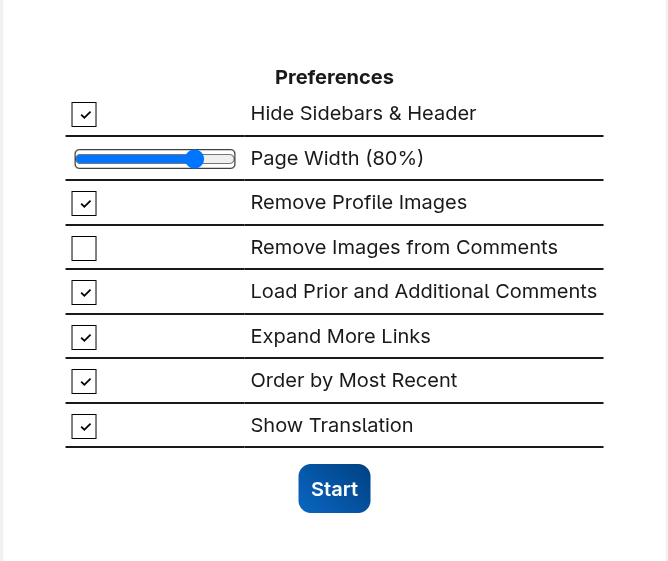
The options the UI control the following:
- Hide Sidebars and Header - Remove the sidebars from the left (your profile) and right (features). This makes better use of screen space and reduces printing length by allowing elimination of vertical columns that are mainly whitespace.
- Page Width: Specify width of text relative to browser window, allowing reduction of wasted whitespace.
- Remove Profile Images: Loading pages with thousands of comments consumes significant memory. Removing user profile images reduces memory consumption as well as printing length.
- Remove Images from Comments: Similar to profile images, images in comments consume memory. If such images are not necessary, for example when using an AI to analyze text comments, remove them.
- Load Prior and Additional Comments: LinkedIn loads only one page of comments, in each thread. This option causes it to load the previous and subsequent comments in such threads.
- Expand More Links: LinkedIn hides text in long comments. This option causes full text to appear for each comment.
- Order by Most Recent: LinkedIn defaults to "Most relevant" view, which makes it impossible to load all comments. This option allows the page to load all of the comments.
- Show Translation: Convert comments in other languages to the user's preferred language.
Having seen a complaint from someone, I think it remove CSS break-all from text, but I didn't write the code, and don't speak JavaScript or HTML or CSS, so I'm not certain.
When you click Start, it starts loading comments, indicating an approximate count of loaded comments and exposing a Pause button.
To create a bookmarklet (do this only once) in google's chrome desktop browser:
- Press
CTRL+SHFT+oto show the bookmark manager. - Click the three dots at the top right to show the bookmark manager menu.
- Click Add new bookmark.
- Add a new bookmark with a Name something like
LICP. This is what will appear in the browser's bookmark toolbar and menu. - Copy the following code into the URL field to define the bookmarklet.
To use it:
- Activate the bookmarklet.
- Configure options.
- Click Start.
To activate the bookmarklet, you can press CTRL+SHFT+b to show the bookmarks toolbar, select the bookmark with the mouse, and CTRL+SHFT+b again to hide it. Alternatively, you can press ALT+F,B and then L some number of times before pressing ENTER.
It's not perfect, but it serves my purposes. Anyone is welcome to copy and modify the code, but please provide me with your updated code.
Demo Video
Test Cases
- Short(er): https://www.linkedin.com/posts/yann-lecun_as-many-of-you-have-heard-through-rumors-activity-7397020300451749888-2lhA
- Long: https://www.linkedin.com/feed/update/urn%3Ali%3Aactivity%3A7269737472706703360
- Translation: https://www.linkedin.com/posts/lars-christensen-422793_l%C3%A6s-dette-tweet-fra-david-sacks-godt-sacks-activity-7399092753055473664--4V7
Additional Posts about using LinkedIn
- https://deliverystack.net/2025/11/21/use-ai-to-analyze-all-comments-in-a-linkedin-thread/
- https://deliverystack.net/2025/11/26/format-text-in-linkedin-comments/
- https://deliverystack.net/2025/11/17/how-to-find-your-old-linkedin-content/
- https://deliverystack.net/2025/11/08/how-to-enter-formatted-content-markdown-into-wordpress-linkedin/
- https://deliverystack.net/2025/05/19/export-and-analyze-your-linkedin/